Moving job
Identify the move and keep it connected to its preparation record.

GE2 MOVE PRO · SCHEDULING & RESOURCES
Date, crew and vehicle: prepare operations with the job record, not with an isolated calendar.
France + Switzerland Software for moving companies
Demos on request: examine crew and vehicle assignments, operational constraints and move-day preparation.
Concept illustration · fictional interfaces and data.
RESOURCES & DECISIONS
Scheduling should make assignments and conflicts visible before moving day, without separating resources from the job record.
Resources & job
Information that
follows the job.
From the first enquiry to operational preparation.
Identify the move and keep it connected to its preparation record.
Keep the planned date, time and duration alongside the job context.
Identify the people assigned to the move and the preparation relevant to them.
Attach the planned vehicle to the job rather than keeping the assignment in a separate conversation.
Keep operational constraints connected to the job and the services in the prepared moving quote.
Bring tasks, responsibilities and checks together with the customer job record.
DEVELOPMENT SCREEN · ENGLISH LABEL ADAPTATION
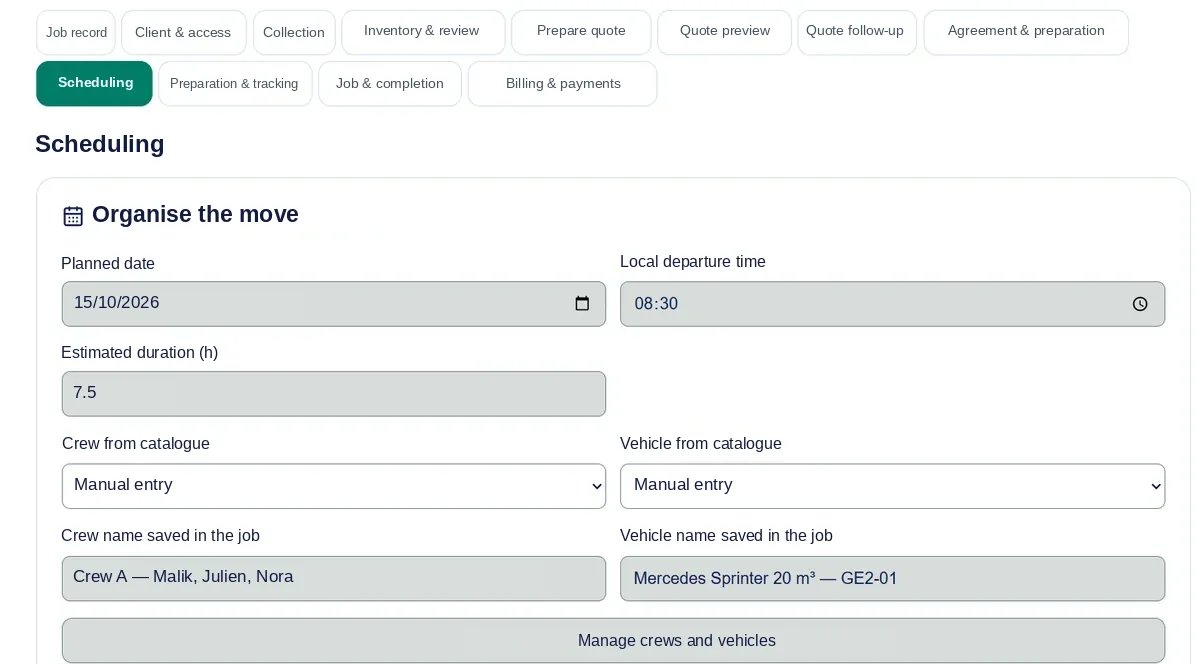
This development screenshot shows a date, time, crew and vehicle associated with a job record.
English-labelled adaptation of a GE2 Move development screenshot · demonstration data · interface subject to change.
Review the moving job, access details and planned services.
Connect the date, time window, crew and vehicle to the move.
Review the constraints and planned resources before confirming the organisation.
Keep preparation information and relevant decisions with the job.
RELATED STAGES
ILLUSTRATIVE WORKFLOW · NO CUSTOMER DATA
Illustrative use case: access requires a different time, or a crew needs to be replaced. The decision affects more than a calendar.
Discuss your organisation →A WORKFLOW TO EXAMINE
Identify the information that changes the job.
Examine the crew, vehicle and other affected jobs.
Prepare the handover to the people carrying out the work.
Illustrative workflow. Rescheduling, notifications and history must be verified in the demonstrated version; no GPS tracking is promised.
Managing a local move does not depend on the network: organise the job, crew and vehicle without activating job matching.
Groupage, shared capacity and cross-border coordination belong to additional modules. Capacity and network workflows can be discussed separately according to your activity and module availability.
No. The approach is to connect them, so information collected earlier remains useful for operational preparation.
This page does not promise automatic route optimisation or GPS tracking. It presents scheduling linked to job records, crews and vehicles.
Rescheduling and traceability are objectives of the operational workflow. Ask to review the functions that can currently be demonstrated and their limitations.
Describe a typical job, the resources involved and a situation where the time window changes. That gives the demo a practical focus beyond a calendar view.
PRE-LAUNCH · INDEPENDENTS, SMES, NETWORKS
A demonstration of jobs, resources and operational preparation, without promises of unavailable features.