
01 / MOVING OPERATIONS
Moving job record
From first enquiry to completion: customer details, addresses and access, inventory and volume, quotes, documents, scheduling, crews, vehicles, billing and follow-up.
Explore job management
RECORDS · INVENTORY · QUOTES · SCHEDULING
Day-to-day job management first, then optional modules without making operations dependent on the network.
Demos on request: choose the business stages and modules you want to explore with the team.
Concept illustration · fictional interfaces and data.
FROM FIRST CONTACT TO MOVE DAY
Keep customer details, addresses, inventory, quotes, crews, vehicles and job follow-up together. Add the functions your operation actually needs.
01 / MOVING OPERATIONS
From first enquiry to completion: customer details, addresses and access, inventory and volume, quotes, documents, scheduling, crews, vehicles, billing and follow-up.
Explore job managementThe customer can provide access details, rooms, photos/video, inventory and constraints before your team takes over the job record.
View the customer journeyPhoto-based pre-inventory, volume assistance and uncertainty flags, with review by your team.
Use additional functions according to your organisation and workflows
Keep job information connected from one stage to the next. Add modules according to your needs and their availability.
Prospect, addresses, access, services, constraints and history stay attached to the job record from first contact.
Collected information supports inventory, pricing and documents without rebuilding context at each stage.
Time windows, crews, vehicles and execution constraints remain linked to the move that must actually be delivered.
Moving-day information stays in a structured job record rather than scattered across messages and attachments.
Quote, deposit, invoice, status and history retain the operational thread and its decisions.
Larger organisations can connect selected modules to existing business systems without forcing a full migration.
YOUR TOOL, IN A REAL WORKFLOW
Customer record, inventory, quote, crew and vehicle scheduling: the demo starts from your organisation and focuses on the functions relevant to your operation.
Keep customer details, addresses, access, inventory, photos and documents together for move preparation.
Walk through inventory to quote, then time window, crew, vehicle and move-day constraints.
Review network, capacity, France–Switzerland and software-connection needs with the team.
The workflow shown in a demo depends on the version and modules selected for the session.
THE PRODUCT, STEP BY STEP
Preparation, inventory and scheduling: explore the screens and choose what you want to examine with the team.
Development screenshot · demonstration data
A fictional record, its steps and its progress in the consumer journey.
How information reaches the professional, and the access process.
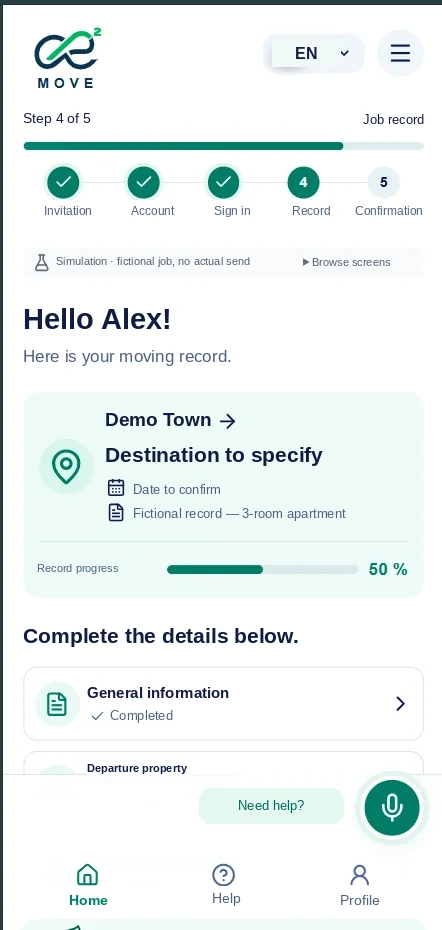 English-labelled development view; application language support remains to be confirmed.
Development screenshot · demonstration data
Photos, items, quantities and volume displayed in the development version.
Correcting an inventory and using it through to the final quote.
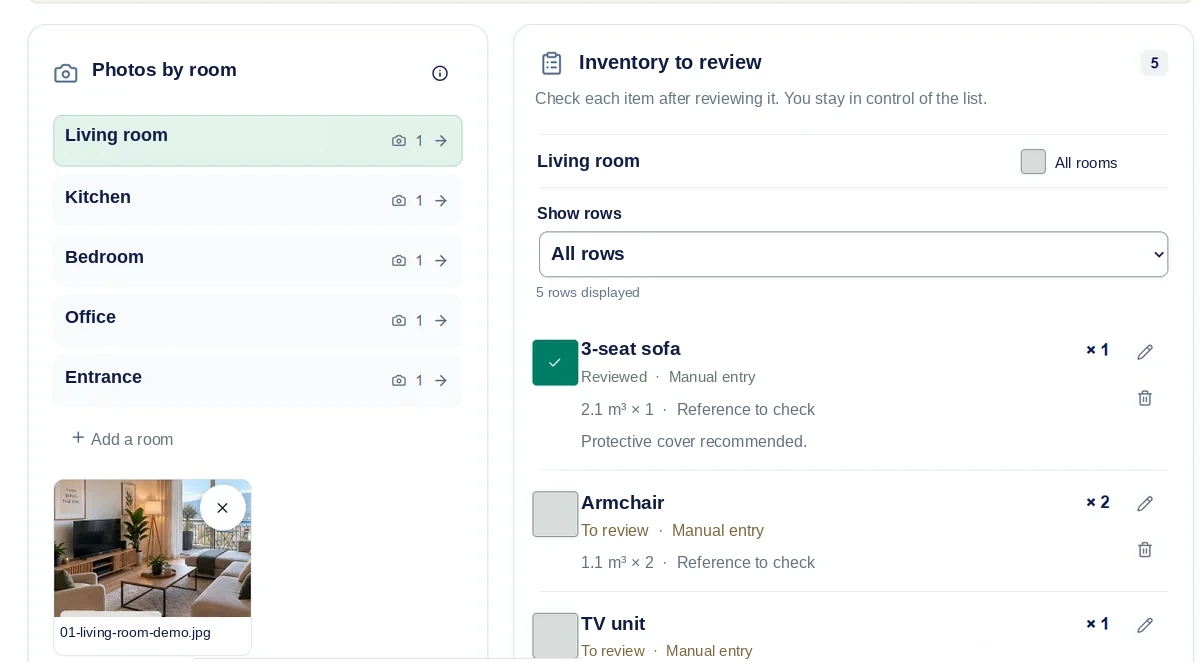 English-labelled development view; application language support remains to be confirmed.
Development screenshot · demonstration data
Date, time, crew and vehicle: the fields visible in the record.
Availability, resource conflicts and reassigning a job.
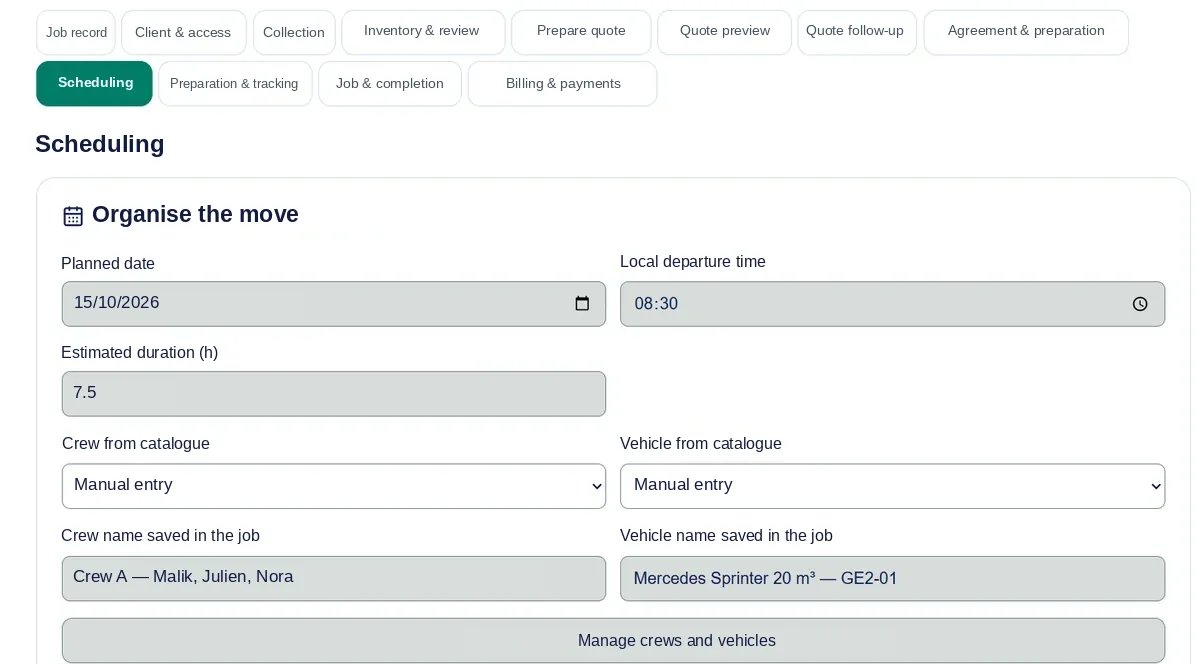 English-labelled development view; application language support remains to be confirmed.
These screens illustrate a development version using demonstration data. A demo lets you examine the corresponding workflow in the version being presented.
YOUR MOVING WORKFLOW
From the first enquiry to operational preparation, each stage stays connected to the same job.
Qualify the enquiry and keep the customer context.
Explore this stagePrepare a proposal using reviewed job information.
Explore this stageConnect the move with its resources and preparation.
Explore this stageShare your priorities: inventory, quotes, scheduling, follow-up, network or France–Switzerland. The team builds the demo around your workflows.